





Replay vision
Contents
For the canonical frame everyone at PostHog uses – the self-driving story and standard description – see Brand foundations.
Elevator pitch
Replay Vision is batch AI analysis of your session replays. Point a scanner at any filtered set of recordings, ask a question in plain language, and get a structured answer back, on demand or continuously, across tens of thousands of sessions or more, without watching one. Findings become queryable events sitting next to your analytics, funnels, flags, and experiments.
There are several YC startups that do this to a much smaller extent as a separate tool, making them quite limited. They also don't have the full data platform and other engineering tools PostHog has. Replay Vision lets you write the criteria, run your scanners continuously, and use the output anywhere in PostHog.
2,500 credits free every month, which is 500 standard observations (or 1,250 lite ones), no credit card. After that, it's usage-based at $0.01 per credit with volume discounts, roughly $0.02 to $0.15 per observation depending on the model, with no tier upgrade or add-on to buy.
The unique belief (in terms of Replay Vision)
The things that explain why your product works or fails for people aren't always events. They can also be behaviors: hesitation, struggle, dead-end exploration, the moment someone gives up without ever clicking anything you track. They live in your session replays, and the only way to see them has been to watch one recording at a time.
The problem is that once you grow past a certain point, it's impossible to watch them all.
So your most important signal about the user experience is also the one you might have been throwing away. Replay Vision reads your sessions for you. The insight that used to take an afternoon of manual review now runs continuously: Replay Vision reads every session as it comes in, based on the scanners you've set up, and the scouts pull what matters into your Inbox.
This is the vision layer of the self-driving engine the scouts rely on to read what happened in a session, the sense that turns raw recordings into signal the system can act on.
Who this is for
- Product engineers, PMs, and founders at product-led companies who record more sessions than anyone could ever watch.
- Teams already on PostHog session replay, recording at volume, currently reviewing recordings by hand or piping them into an outside AI tool to make sense of them.
- PMs and founders who want summaries and journey interpretation.
- Support and ops teams who want anomaly and friction flagging: "show me the sessions that went wrong."
- Technical teams who want scan results piped into agents and workflows via API.
- UX researchers who want increased rigor in how they understand and monitor user behavior
Any of these can be the champion. The common thread is someone drowning in recordings, or anyone who sees the value in recordings but doesn't engage with them actively due to volume.
Messaging
Message 1: Your product watches its own session recordings
Problem: Watching replays doesn't scale. Past a certain volume, review turns into spot-checking: someone sets aside an hour, watches a dozen recordings, and forms an impression from whatever they happened to click on. Everything else goes unwatched.
Solution: Scanners read the recordings for you and deliver a standing read on your sessions, on a cadence you determine.
Supporting features:
- Built-in scanner templates cover the common shapes, so a customer can start without writing a prompt
- Scanners summarize and label any set of recordings automatically, across hundreds at once
- Bulk-scan on demand, or set scanners to run on a schedule
- Findings land as queryable events and get routed to your Inbox, so what matters surfaces to you instead of piling up as a backlog to review
- Sampling and coverage controls scope a scanner to a percentage of matching sessions, or to one segment or page
Message 2: Your sessions can answer questions now. Just ask.
Problem: Your metrics tell you the funnel drops at checkout. They don't tell you why. The answer is in the recordings, but the handful that explain it are buried among thousands that don't, and the only way to find them is to watch everything else first.
Solution: Ask PostHog AI (or any of your preferred agents) in plain language and get the behavior behind the metric: why they hesitated, struggled, or gave up. Failure modes that were never event-shaped become visible.
Supporting features:
- Ask in plain language, and an agent (Claude, Cursor, your own workflow) spins up a scanner through the PostHog MCP, runs it, and reads the answers back
- Configure a scanner once for any question you have
- "Why are mobile users dropping at checkout?" becomes a question your sessions answer
- Monitor and classifier scanners flag and tag sessions automatically
- Summarizer and scorer describe struggle, confusion, and abandonment your events never captured
- Every observation deep-links to the exact moment in the recording
Message 3: Session insights, right next to all your product data
Problem: Your analytics live in one tool, and the AI that reads your recordings is a second subscription on top of it – often with your session data exported to a third party to get there. That's two bills for one job, and the bigger cost is that the findings are stranded: "users hesitate at checkout" sits in a different tool from the funnel, the flag, and the error that explain it.
Solution: Analyze your sessions where they already live, under one bill, and one platform. Connect the findings to the rest of your product data.
Supporting features:
- Observations become queryable events, sitting next to your analytics, funnels, flags, errors, and experiments
- Chart scanner output over time, and feed it into cohorts and experiments
- Because it's all one system, a replay finding connects to the funnel, the error, and the release that caused it, and the fix comes back to you in the same place
- Refined output via API, no raw export needed
- Spend projects forward per scanner, so cost stays legible as usage grows
- Keep your sessions on PostHog instead of paying a second tool to scrape and analyze them
Battle cards
vs FullStory (StoryAI)
Their approach: Summaries, Opportunities, and Ask StoryAI. Gemini-powered. The most mature offering, but locked inside FullStory's platform and pricing.
Where PostHog wins:
- No per-run cap. StoryAI analyzes 10 recordings per run; PostHog points a scanner at any filtered set of recordings.
- Everything past the basics is API-only for them, and gated to Enterprise/Advanced: custom prompts, yes/no monitors, arbitrary labels, scoring on your own criteria. In PostHog all four are in the UI on every plan.
- Their UI classifier does sentiment and nothing else.
- Findings come back as queryable events you can chart over time and feed into experiments and cohorts. FullStory returns AI output via API and stops there.
- Scheduled and continuous runs, plus sampling and coverage controls. FullStory has fixed jobs and no sampling controls.
- Usage-based pricing against their tier-plus-add-on.
Where they win, say so: natural-language search, deep-link citations, mobile replay AI, and proactive alerts are all table stakes both of us have. The maturity argument is real; the lock-in and the 10-per-run ceiling are the openings.
vs Contentsquare
Their approach: Planned analyses with a 100-recording-per-run ceiling, Sense Analyst in beta for custom prompts, and a vendor-trained 0–100 friction score. Scheduled runs, MCP access, and a REST API are all there.
Where PostHog wins:
- Their AI output is one number. The friction score is the only thing that becomes queryable, chartable, or usable in experiments and cohorts. PostHog turns every observation into an event you can use anywhere.
- Configurable scanner types (monitor, classifier, scorer, summarizer) against their fixed planned analyses.
- No 100-per-run cap, plus sampling and coverage controls they don't have.
- Their score encodes their definition of friction on a fixed scale. The Frustration score scanner template lets you set the scale and the criteria.
- Custom prompting is still beta for them.
Where they win, say so: their score works with no configuration on day one. If the buyer wants a number handed to them rather than criteria they define, Contentsquare is the easier sell.
vs Datadog
Their approach: One fixed AI job over session data, priced per 1,000 sessions. Telemetry-only natural-language search, MCP limited to RUM events.
Where PostHog wins:
- You can't point it at a filtered set of recordings at all. No custom prompts, no monitors, no classification, no cross-session theme summaries, no mobile replay AI.
- No queryable findings, no charting, no experiment or cohort feed, no proactive anomaly detection on AI output.
- Their custom metrics aren't AI-derived.
- The usual frame applies: Datadog is infra-first, and this is a product behavior question.
vs Mixpanel
Their approach: Playlist-based fixed job, cross-session theme summary in beta, natural-language search via MCP. Tier plus add-on.
Where PostHog wins:
- Playlist-scoped only, with no custom prompts, no monitors, no classification, no scoring.
- Their theme summary is still beta.
- No queryable findings, no charting, no experiment or cohort feed, no REST API for AI output, no mobile replay AI.
vs Sprig AI Analysis for Replays
Their approach: Themes replay clips automatically, but it's a separate UX-research tool with targeted capture, not analysis across all the sessions you already record.
Where PostHog wins:
- Targeted capture means they analyze the sessions they went out and recorded for a study. Replay Vision analyzes everything you already record, continuously.
- Research-cycle shaped, so answers arrive when a study concludes rather than as sessions come in.
- Their output stays in a research tool. Ours becomes events next to your funnels, flags, and experiments.
vs bolt-on AI scrapers (Lucent, HumanBehavior, Autoplay)
Their approach: Customers pull replays out via API into a separate AI tool, paying twice and shipping their session data elsewhere.
Where PostHog wins:
- Two bills, one of them for storage you're already paying us for.
- Session data leaves your platform and lands with a vendor you haven't diligenced.
- Their output can't come back as events, so nothing charts, nothing feeds an experiment, nothing reaches your Inbox.
- $0.02 to $0.15 per observation with 500 free every month is hard to beat by adding a vendor.
Objections
"We already pay for FullStory, and StoryAI is included."
Answer: StoryAI is the most mature product in this space. The ceiling is the opening: 10 recordings per run, and custom prompts, yes/no monitors, arbitrary labels, and scoring on your own criteria are all API-only on Enterprise and Advanced. Their UI classifier does sentiment. So the person with the question usually can't run it, and the run is too small to answer it anyway. On PostHog, scanners cover any filtered set, in the UI, on every plan.
"We already built our own AI replay analysis."
Answer: The analysis is the easy part. What they haven't built is anywhere for the answer to go. A DIY agent produces a report; Replay Vision produces events next to your funnels, flags, experiments, and errors, so a finding becomes a cohort, a funnel breakdown, an experiment population, or an Inbox signal. Observations also arrive already joined to who the person is, their plan, and their flag variant. Rebuilding that join is the expensive part, not the model call.
"Is this HIPAA compliant?" / "A model is reading our users' screens."
Answer: On masking: privacy controls run in the browser, so masked content never reaches PostHog or a scanner. Vision sees exactly what Session Replay captured. Careful there, because a customer masking inputs but not text and images is still sending those. On HIPAA: no. Scanners send session data to an external AI subprocessor and we hold no BAAs with them. If they're under a BAA or handling PHI, Vision isn't available today. Address your additional questions in #legal.
"Usage-based pricing means we can't predict the bill."
Follow-up: How many sessions a month, and is the worry the total or one runaway scanner?
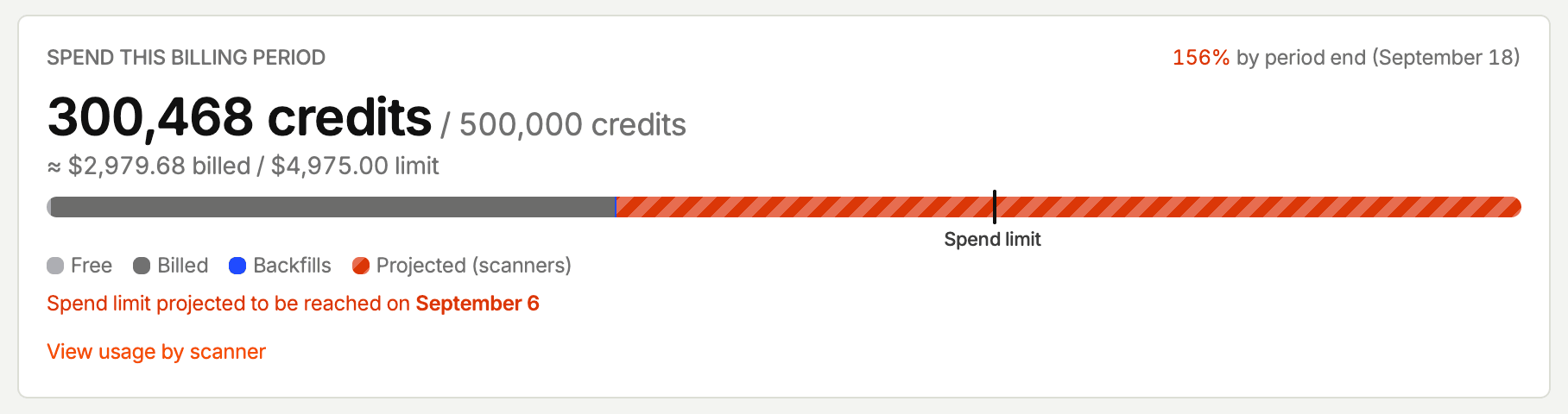
Answer: Start with the unit, since that's the opaque part: a credit is $0.01, and an observation costs 2, 5, or 15 depending on the model. The spend widget projects forward, showing what you'll land on by period end and the date you'll hit your limit. You find out in week one, not on the invoice. "View usage by scanner" names the one responsible, so you fix it instead of throttling everything. Before creating a scanner, ask the MCP to estimate its volume. After, cap it with a per-scanner monthly budget – $100 for this one, $50 for that one – on top of the organization-wide limit, and scope it further with sampling and filters. A runaway scanner stops at its own ceiling instead of eating the whole budget.
"Can we use our own model, or our own API key?"
Answer: Not today. Scanners run on a fixed lineup chosen for output quality, and you pick among them per scanner at 2, 5, or 15 credits. The lineup is narrow because the pipeline is built around it – recordings are rasterized into video before a model ever sees them, which this engineering post walks through. Bring-your-own-key has been asked for by beta customers and is under discussion, with no date. If the ask is really cost, the lightweight model plus sampling usually closes the gap. If it's about where data goes, that's the compliance answer above.